Showing posts with label Facebook Business Page. Show all posts

Monday, March 20, 2017

Are You Missing Social Media Opportunities?


No one likes to be talked about behind their back. So, when it comes to social media, why are so many business owners okay with letting that happen? Here are four ways businesses miss opportunities to connect with their customers and prospects on social media, and what they should be doing instead:

  1. Ignoring Yelp Reviews: "My Yelp reviews are almost all four or five stars. I don't need to respond to them, right?" I've heard this countless times from business owners who are only checking their Yelp listings once a month, or less. If someone was raving about you in person, you wouldn't ignore them, would you? Thanking someone for a rave review is a great way to keep them coming back to your business! Claiming your Yelp listing (another step many businesses miss) and monitoring reviews on a regular basis ensures that less positive reviews don't slip through the cracks. Responding to each review you receive, positive or negative, shows that you are responsive and on top of your customer service. This applies to other review sites as well, like Google and even Facebook.
  2. Ignoring Facebook Interactions: From check-ins and messages to wall posts and even simple comments, some businesses just ignore interactions from people on Facebook. They do so at the risk of damaging their relationship with people leaving positive interactions, and further angering those with negative interactions. Negative feedback can also have a snowball effect, with others chiming in when you don't see or respond to the first interaction. Following up on each interaction instead ensures that you will maintain positive relationships with happy customers and that you will control the conversation around negative interactions.
  3. Missing Twitter Mentions: Savvy Twitter users know that often the best way to reach out to an organization for customer service is by mentioning them in a tweet. A company that isn't monitoring their mentions closely risks the ire of people who can't get in touch with them. Instead, follow up on mentions with a response, like or retweet, and follow the user if appropriate. Following a user shows them that you care about what they have to say, and allows you to engage with them in the future, whether they're talking about your business or not. Creating a private list of users who have mentioned you in the past is another good way to keep track of customers for future outreach opportunities.
  4. Missing Instagram Tags: Especially if a business has a physical address and a Facebook Page, there's a good chance people have tagged their location in Instagram photos. Businesses, or their representatives, should monitor photos tagged at their location and follow up on these posts by following the user, if appropriate, and liking and commenting on the post. This also applies to mentions and hashtags using the business's handle and name. Regramming and sharing these photos on other social social media channels is also a great source of content for you!
These missed opportunities on social media happen for a few reasons. Sometimes it's because businesses are afraid of negative interactions, or don't know how to respond in general. Sometimes it's because they see social media only as a sales tool, and not as an opportunity to connect with current and prospective fans and customers. Most often it's because the business owners and staff don't have time to keep up with their social media interactions. If any of these apply to you and your business, I can help. Please don't hesitate to get in touch.

Happy Networking!

Lauren

Thursday, July 7, 2016

Don't Wait to Get Started on Social Media


One thing I hear fairly often when talking with business owners, especially small, family-owned businesses, is that they are so busy and that business is going so well that they don't need social media. And/or that they'll wait until their slower season to get started. Here's why I encourage them not to wait.

If you haven't been on social media at all during your busy season, it's going to be a rough start during your slow season. That's because of the algorithm that determines whether or not people see your posts. Facebook has had them for a while, and Twitter and Instagram are getting started now too. One of the main factors that influence the algorithms is whether or not someone has interacted with you recently. When you haven't been online for a while, or ever, your posts are less relevant and have less of a chance of showing up in people's feeds.

The busy season is the best time to capitalize on existing customer engagement. When you're busy, you can extend customer interactions to the social space, or find and celebrate existing social interactions that you may not even be aware of, and increase your visibility. Capturing those positive interactions with your fans now will keep them interacting with you during your slow season, and generate viral reach to their friends.

So what are you waiting for? Get out there and socialize!

If you need help, I'm always happy to answer questions.

Friday, February 19, 2016

Like Facebook Pages as Your Facebook Business Page - Social Media Basics

Liking other Facebook Pages with your Facebook Business Page is a simple business-to-business outreach and engagement technique. The Pages you like will receive a notification that your Business Page liked them, and hopefully they will like your Page in return and interact with your content.

The Pages you like will appear publicly on your Business Page under "Liked By This Page." 

The few featured Pages will rotate regularly, displaying up to five Pages. If you want certain Pages to always appear on that list, you can choose them in the Featured tab of your Settings page.

Clicking on the small "Liked By This Page" list will bring up the full list of Pages your Page likes. This list is also visible to the public. Clicking on the dropdown next to the Page name will allow you to get notifications from the Pages your Page likes, to see their posts in your personal News Feed, or to unlike them as your Page.


On the flipside, you can see the full list of Pages that like your Page under Settings - People and Other Pages - Pages That Like This Page. If you want to remove or ban a Page from liking your Page, click on the settings wheel to the right of that Page's name in the list.


When you like Pages as your Business Page, their content will appear in your Page's News Feed. To view that Feed, visit the Facebook Business Page bookmark page and click "Log In" next to the name of your Page. From there, you will navigate Facebook as your Page, and be able to like new Pages by looking them up in the search bar, and interact with content you see in the News Feed. The blue top navigation menu will show you that you are using Facebook as your Business Page. To switch back, click the dropdown arrow at the right of the top navigation bar, and click your Profile name.

You can also see the full list of Pages your Business Page likes, as well as the News Feed from those pages, anytime on your Pages Feed. To visit it, go to https://www.facebook.com/[your Page username]/pages_feed

Have fun exploring Facebook and liking Pages as your Business Page! If you have any questions about this process or need help managing your Facebook Business Page, please get in touch via my website.

Monday, February 8, 2016

A Quick & Simple Way to Generate Facebook Page Engagement


Because of the way Facebook's EdgeRank algorithm filters the News Feed, Page managers need to be creative to generate authentic engagement. One quick and easy technique, especially for smaller businesses and solopreneurs, is to send individual Facebook post links to family, friends and customers to ask for engagement. If you're annoyed that people who might particularly be interested in a certain post aren't seeing it, make it happen by sending them the direct link to that post. 

The timestamp to the post is the link. You can either right click on it and use your browser's dropdown menu to copy the link, or left click to open the individual post and copy the url from there. (Click here to see what that looks like.)

This technique works best when you choose a post that has particular meaning for the person or people you're sending the link to, and when you provide a specific call to action. For example, a skincare representative might send the link to a post about a particular product to a client who has used that product, and ask her to share her experience in a comment on the post. Or an auto mechanic might post a photo of a client's car and send him the link, asking him to like or share the post to his friends.

Since EdgeRank factors in a person's recent engagement with the Page to determine whether they should see more posts from it, this technique will also make the people you send post links to more likely to see your posts in the future. It's the engagement gift that keeps on giving!

Friday, October 23, 2015

How and Why to Use Facebook's Save Feature

Whenever I see someone post something with a caption like "saving this for later" I cringe. You see, last summer Facebook introduced a feature that should have done away with that type of post. The problem is too many people are oblivious to its existence.

Facebook's "Save" feature allows users to save any type of Facebook post (link, photo, video, etc) for later viewing or sharing, or just for posterity. It organizes saved items according to category. For social media managers especially, the Save feature is a handy way to collect ideas and items to use later, since Page shares can't be scheduled in advance. For regular users, saving items saves your friends the headache of seeing yet another "For later" post in their News Feed. Because of the EdgeRank filtering algorithm, it also means that they'll see more of the things you want them to see, like and comment on.
Here's what not to do. The original post even contains a call to action that the save feature is intended to replace: "Share to save this to your timeline!!!" This type of call to action can actually decrease the reach of posts by brands because of last November's news feed changes to discourage promotional language and "click baiting." 

Click on the dropdown arrow at the top right corner of any post and then click "Save." 

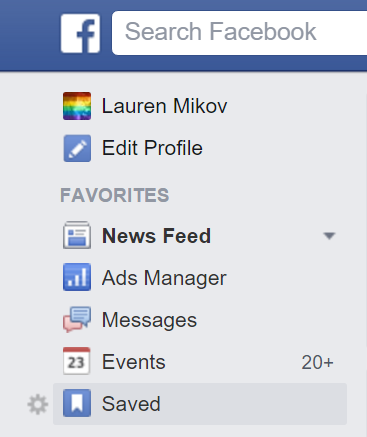
You'll find your saved items by clicking on the "Saved" link in the left-hand menu on your homepage, or at facebook.com/saved.
Your saved items are organized by the date you saved them under All, or according to the type of post.

Happy saving!

Monday, February 17, 2014

Local TV Stations & Facebook Calls to Action

Local news agencies are making the most of their Facebook posts by using specific, targeted calls to action. This often takes the form of asking fans' opinions on controversial or positive topics. In many cases, however, this means benefiting from bad news by asking fans to share their condolences and sympathy in response to tragedies. Whether the topic is positive, controversial or tragic, these specific prompts serve two purposes: generating engagement, which boosts the Pages' EdgeRank, and reducing the likelihood of off-topic remarks and flame wars in the comments. Below are examples of calls to action from the four major TV news outlets in the Seattle area.


Among local news outlets in this area, CBS affiliate KIRO 7 seems most likely to prompt for responses to tragedies, such as this death in a car accident. Calls to action on tragic events like this draw an outpouring of support for those affected, but often a few negative comments towards the station for trying to benefit from a tragedy. In a formula that covers all the bases, KIRO's post uses a photo that appears to be pulled from the young man's Facebook profile, includes both a link to the story online and a prompt to watch the news story on TV, and closes with the call to action.

NBC affiliate KING 5 takes advantage here of a topic residents love to talk about - bad drivers! The photo they used is likely a screengrab from the news story. They lead the post with their excellent call to action that requests a specific type of feedback on a particular and popular topic.

ABC affiliate KOMO 4 taps into the popular throwback trend here. In a smart move that will increase their EdgeRank even further, KOMO's call to action requires users to engage with the photo they shared in order to answer the prompt. Like their friends at CBS, KOMO phrases their call to action as a statement rather than a question.

In their rather bland, cookie-cutter call to action, and accompanied by a stock photo, Fox affiliate Q13 comes across sounding like a psychologist. While people (dare I say Fox viewers in particular?) may have strong opinions about how the new Mayor is paying aides compared to the outgoing mayor, a clearer, more specific prompt would have been more effective here.

When crafting calls-to-action for your own Facebook Page, keep these examples in mind and strive to do the following: ask for responses to interesting, engaging topics, play with using statements vs. questions, tap into people's emotions, and ask for specific feedback.

Friday, May 3, 2013

What's in a name? Name Your Facebook Page Carefully


Business owners and Facebook Page administrators must choose their facebook page names wisely, or risk difficulty down the road. Facebook's Page Name Guidelines provide some direction for establishing a page name, including using proper grammar and avoiding superfluous descriptions. But often, and by the time page administrators realize their page needs to be renamed, it's too late. It used to be entirely impossible to change a page's name once it reached 100 fans. Facebook now allows page admins to submit a name change request form, but can only do so once.
What's in a name? Page names are the most visible representation of a brand on facebook. In addition to providing a physical title to the page, the name of a facebook page also impacts its visibility in the News Feed. It also reflects the ease with which a page can be tagged in posts by other people and pages.
So why would a page name need to be changed? The most common potential problem, besides the always annoying typo, is illustrated by event pages with sponsor names (think Tostitos Fiesta Bowl.) Fun Fact: The Fiesta Bowl has changed names, and sponsors, three times since it became the first bowl game to acquire a title sponsor in 1986. Events like the Fiesta Bowl are usually the pages most likely to include ‘superfluous descriptions’ like sponsor names, locations and dates.
For large events like the Fiesta Bowl, which has more than 13,700 fans, it may be easier to get through facebook's page name change process due to their visibility. On the other hand, for smaller events with less than a national presence, it can prove extremely difficult, if not impossible. 
Page admins should get involved in their organization's sponsor contract drafting process. This is to ensure that sponsor mentions happen only in the account's posts and in the ‘About’ section. Loyal sponsors like Tostitos may stick around for 18+ years. But if their contract ends, the admin may have a tough time renaming the page. Since page names can only be changed once, if a sponsor change takes place again, the page will become obsolete and the event will have to start with a brand new Page. 
When many admins try to change the name of their pages, they are unable to do so. In the official Pages Terms, Facebook provides a vague description of its page name policy, but does not outline it in detail. The process of approving name changes is left to the discretion of Facebook staff. As noted by hundreds of users in Facebook's community forums, that can be hit or miss.
While the Pages Terms naming section is vague, some further clarifications are provided in the Page Name Guidelines and noted again when an admin first initiates a name change request:
From there, the admin must select the type of page: a business or company, a person or public figure, an organization, a website or blog, an event, or other. The page type selected brings up a handy list of "things to keep in mind," giving the admin some further guidance on things to avoid this time when creating their new page name, such as specific dates, locations, corporate sponsors, taglines and other descriptions. Admins who find their page request declined may be in violation of these requirements. 
The final step in the process, which Facebook claims will help "expedite the process" is to "upload documentation that clearly shows the name and address of your business", such as a utility or phone bill. For pages without official documentation, this step can be the final insurmountable barrier.
Given the inherent difficulties in the complicated process of changing the name of a Facebook page, business owners and page administrators should study the Page Name Guidelines, choose their page name wisely and be willing to stick with it - or be stuck with it - forever.
This article is a repost of my article on SocialMediaClub.org

Monday, October 8, 2012

Timing is Everything - Using Facebook's Scheduling Tool Can Help

There is a tide in the affairs of men, which, taken at the flood, leads on to fortune. 
William Shakespeare

Companies like Hootsuite and Sprout Social have made a big business out of scheduling tweets and Facebook posts, and for good reason. Scheduling posts in advance allows admins to better manage their workflows and take advantage of high-traffic and high-engagement times of day. There are plenty of arguments out there why you should or shouldn't sign on with scheduling services like these, and what times of day and days of the week are best. The consistent thread through all these arguments is that carefully timing your posts is crucial to maximizing potential impressions and engagement. 

Earlier this year, Facebook took some of the power back from the scheduling services by launching its own post scheduling tool. If you manage a Facebook Page, congratulations! You already have access to it. This post will cover how to use Facebook's scheduling tool, and some of its pros and cons.

In order to use Facebook's post scheduling tool, your Page must first have a Start Date (this is different than the Joined Facebook date.) You can edit your Start Date in the Basic Information section of your Page, or by scrolling to the very bottom of your Timeline. You'll be asked to identify at least the year of your Start, and the type of start: Born, Founded, Started, Opened, Created, Launched. You also can fill out the Timeline story of your Start Date with photos and text.


Once you have designated a Start Date, you're ready to jump in and start scheduling your posts. You can backdate or preschedule posts by clicking the little clock at the bottom left corner of the sharing tool.


Write your post as you usually would, including adding photos or links and even tagging other Pages. The ability to tag and to more seamlessly upload photos are two main reasons why I prefer scheduling posts straight through the Facebook platform. Once you have everything set to go (if you're posting a link, remember to clean up the header and body text in your link preview box, select a thumbnail if one is available, and then remove the URL from your post text,) select a date and time for your post to go out, and click schedule. The post will be added to your Activity Log.


If you are backdating a post, clicking Post will automatically generate a News Feed story and add the post to your Timeline. If you would like to add the post to your Timeline without generating a story, click the box next to "Hide from news feed."
Prescheduled posts will appear in your Activity Log. From there, hover over the top right corner and click the arrow to change the time, publish the post now, or cancel the post. One of the current disadvantages of using Facebook's scheduling tool is that posts can't be edited - they can only be cancelled and prescheduled again. So if I wanted to change the post below and correct it to reflect the correct highest engagement time from the Bit.ly study, which is 3pm, I would have to cancel and repost it.


So there you have it - prescheduling and backdating posts in a nutshell. Once you give it a try, let me know what you think! If you've already been using this tool, or if you use other scheduling platforms, which do you prefer and why? What are some advantages or disadvantages? What are your Page's highest-engagement dates/times? As always, if you have questions or need help, leave a comment or send me an email. Happy posting!

Friday, August 17, 2012

How to Use Current Fans to Get New Facebook Fans


My parents always told me it's easier to get a job when you have a job, and I know from personal experience that it's unfortunately easier to find suitors when you're in a relationship than when you're single. That's because having a job or a partner shows people that you are a caring, competent individual with certain skills - someone they want to hire and be around. When you're employed or in a relationship, chances are you are focusing on those relationships instead of desperately marketing yourself in an attempt to get seen. The same goes for social media - in order to get new fans interested in you, you need to engage your current fans. 

Having a huge fan base is great, especialky in the eyes of executives, but if none of them are liking and commenting on posts or posting on your wall, that means diddly. If people aren't engaging with your page, chances are they aren't even seeing your posts in their News Feed either. In the battle for EdgeRank, a Page with 200 active fans is always going to win out over a Page with 2,000 inactive fans. An inactive Page not only suffers in terms of EdgeRank and viral reach - potential new fans who visit the Page see it as stagnant, not a community of fans they would like to join.  

One of the most important statistics in your Facebook Insights is "Friends of Fans." Think of that number as the potential reach of your posts, if your fans interact with them. It's also a pool of potential new fans. My Page, for example, has less than 100 fans, but they have a total of 48,171 friends. If I hit a grand slam and all 95 of my fans liked or commented on a post, that would be the total viral reach. Pretty huge, right?

So before you spend a single cent on Facebook advertising or bemoan your small number of fans, beef up your posting strategy. Post content that is designed for engagement and your EdgeRank and viral reach will increase, and eventually so will your fan base.

Wednesday, April 25, 2012

The Four Stages of Social Media Engagement

These days, every business has some sort of social media presence - whether they know it or not. Customers and potential consumers want to engage with the brands they are interested in online, and they will often do so regardless of whether or not that brand is willing or able to engage with them. It's in a company's best interest, therefore, to determine which social stage they are at and to become more engaging. Here's what I see as the four D's, or stages, of social media engagement (and no, I know you're thinking it, but they're not the same as the five D's of Dodgeball):
Dead    You have zero social media presence - that you know of. The problem is, you probably have several listings set up by social media users, usually on location-based platforms like Yelp or Foursquare. You probably have some old Places listings or Community Pages on Facebook, or both, and maybe even an impersonator or two on Twitter. The process of cleaning up and taking control of these listings, once you realize they're out there, is tedious and sometimes requires copyright infringement complaints and legal involvement.
Dormant    You, or more likely some intern you had two years ago, set up some social media accounts for you a few years ago, but nobody has posted anything since. Most of your Twitter followers are probably robots, and your Facebook wall is full of spam. You definitely don't have a cover photo on Facebook. You might not have a way to contact your old intern to get login information for these accounts, or to obtain administrative access, so you might have to submit a request to the social networks to force a claim. 
Dabbling    You post maybe once a month and respond to old comments, mentions and other interactions on that schedule as well. When you heard about the Timeline update on Facebook, you posted a cover photo, but you haven't posted since then (has it really been almost a month already?) Your fans are probably frustrated with your slow response rate, and your EdgeRank (the algorithm measure that Facebook uses to determine whether users see your updates or not) is almost nonexistent.
Dynamic    Congratulations! You're active on social media - posting on a regular schedule, keeping your accounts looking sharp and responding to user interactions quickly. You've probably even gone in and filled out your Facebook Timeline with significant milestones. As a result of your consistent approach to posting and community management, users are excited to interact with you and your EdgeRank is excellent.
Wherever you are on this spectrum, the important thing is to recognize it and work towards more dynamic engagement. If you don't have the time, energy or know-how to do so, it's in the best interest of your business to find someone who does. So which social stage describes your business? Is there another step or two you would add? Please let me know in the comments section below. I'd love to hear from you there, or on Facebook or Twitter.

Next Up: A how-to for claiming Places listing, Community Pages and other Facebook Page duplicates.